What Pages Did a Lead View Before Filling In Your Form?
Yes, some CRMs link form submissions to earlier page views. Here is what to look for, what intent signals really tell you, and where AICRM fits.
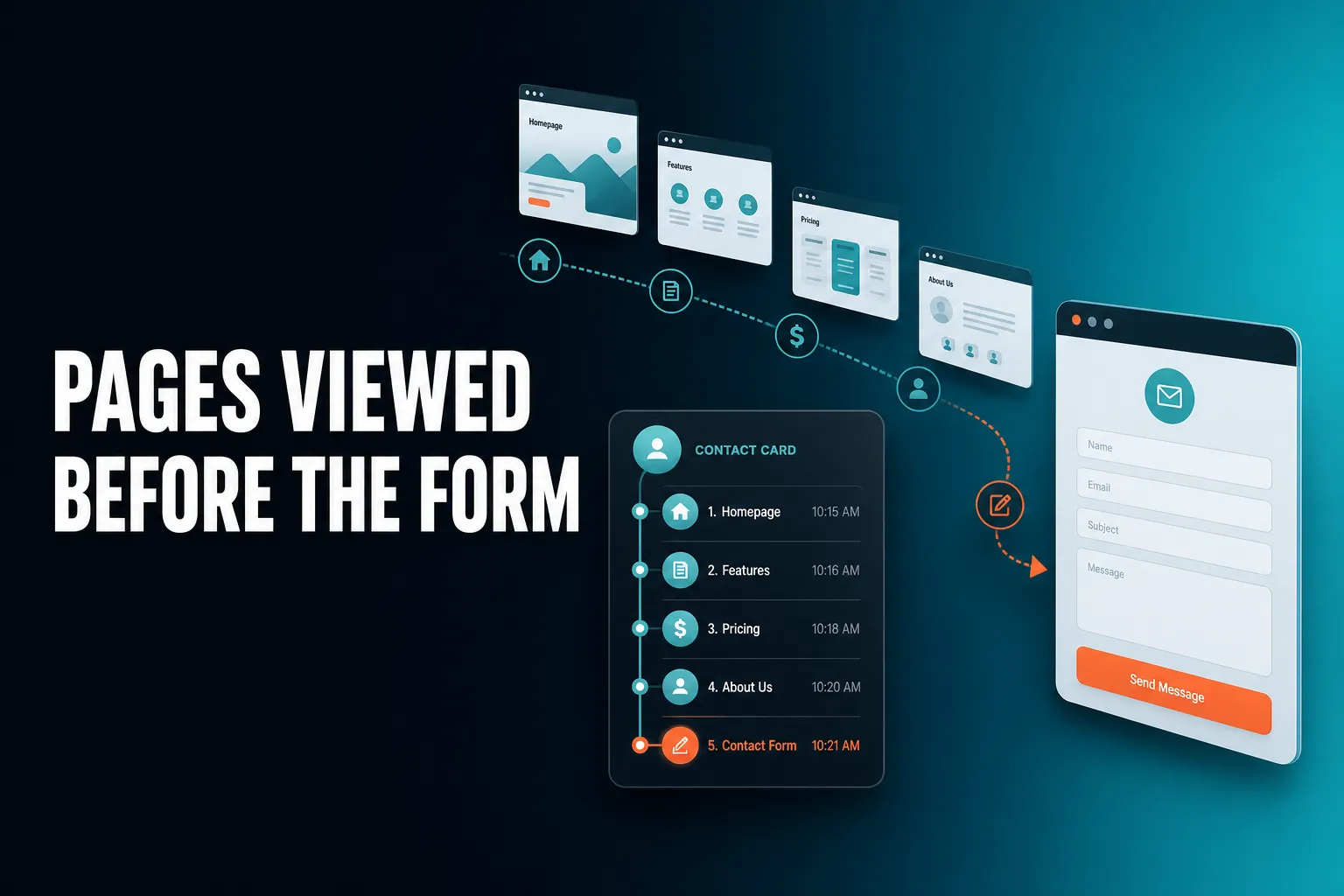
Yes. A CRM with website tracking can show which pages a lead viewed before they filled in your form, because it ties the submission to the earlier browsing of the same visitor. AICRM does this through its embeddable forms, and several larger platforms offer something similar. Seeing buying intent before the form is a different job: it usually works at company level, or for people you already know.
Can a CRM tell me what pages a lead viewed before filling out a form?
Yes, if the CRM has website tracking and forms that work together. The tracking records page views for an anonymous visitor. When that visitor submits a form, the CRM creates or matches a contact and attaches the earlier page views to their record. A CRM that only stores the form fields cannot do this, because it never saw the browsing in the first place.
The practical difference is large. Without tracking, a form submission tells you a name, an email address and whatever message they typed. With tracking, you also see how they got there and what they read first.
What you can typically see
- The first page they landed on and where they came from (search, direct, a referral link). This is often called first-touch source.
- The pages they viewed, so you can see whether they read about your services, your pricing or a case study.
- Whether they came back more than once before submitting.
- What they did after the form, since the same history keeps building on their record.
A concrete example
Imagine you run a small consulting business. Someone fills in your contact form on a Tuesday with the message "Interested in a chat about your services." That tells you very little. But their record shows they arrived from a search, read your services page, opened your pricing page, and looked at a case study before submitting. You now know they are comparing options and care about cost, so your reply can open with the pricing question rather than a generic hello.
Where this can go wrong
Tracking has gaps, whichever CRM you use. If someone browses on their phone and fills in the form on a laptop, the two sessions may not join up. Browser privacy settings and cookie consent choices can also mean some visits are never recorded. Treat the history as a useful clue, not a complete record.
Which CRM connects form submissions to website browsing history?
Several do. Many larger marketing platforms, HubSpot among them, offer website tracking tied to forms, usually as part of a wider suite and sometimes only on certain plans. Smaller CRMs vary: some only capture form fields. AICRM connects them by design: its embeddable forms tie every submission to the visitor's full browsing history, first-touch source included, and page-view history shows on each contact's timeline.
The right choice depends less on whether the feature exists and more on how it is packaged and how much else you have to buy or set up around it.
| Approach | What you learn | Main limit |
|---|---|---|
| CRM with forms only | Name, email, message | No browsing context before the submission |
| CRM with forms and page tracking | Pages viewed, first-touch source, return visits, tied to the contact | Gaps from privacy settings, consent choices and switching devices |
| Company-level visitor identification | Which companies are visiting, and which pages they view | Does not name the individual person |
| Specialist intent-data tools | Wider signals about companies researching topics | Extra cost and setup, usually aimed at larger sales teams |
If you already use a bigger platform, check which plan includes tracking before you assume you have it. If you are a small team choosing from scratch, look for a CRM where forms, tracking and contact records live in one place, so you are not stitching three tools together.
How does a CRM link anonymous browsing to a form submission?
Typically, a tracking script on your site records page views against an anonymous identifier held in the visitor's browser. When that visitor submits a form, the CRM learns who they are for the first time and attaches the history already recorded under that identifier to the new contact record. From then on, new page views add to the same timeline.
This is why timing matters. The tracking generally has to be on your site before the visitor arrives, not installed after they have already submitted. It is also why a form on your own site tends to work better than a link to a third-party form page: the tracker has to see both the browsing and the submission.
In AICRM, this tying happens automatically when a form is submitted. Because voice, forms, imports and manual edits all write to a single contact table, the person does not end up as one record from the form and another from a spreadsheet import. Duplicate detection by email also stops a CSV re-import creating copies.
What should I look for in a CRM that tracks form submissions and page views?
Look for a CRM where forms and tracking come from the same system, where page views appear on the contact's timeline in order, and where the information surfaces without you digging for it. Also check how it handles consent, what it can and cannot identify about anonymous visitors, and whether tracking is limited to higher-priced plans.
A short checklist:
- Forms and tracking in one place. If they are separate tools, the join between them is where things break.
- First-touch source. Knowing whether someone came from search, a referral or direct traffic helps you see which channels bring real enquiries.
- A readable timeline. You want pages, emails, calls and notes in one history, not a separate analytics screen.
- Alerts, not just data. Browsing history only helps if you notice it. Check whether returning visitors are flagged for you.
- Honest limits on anonymous visitors. Be wary of any claim to name individual anonymous people from a website visit alone.
- Consent and privacy. If you operate in the UK or EU, check how tracking fits with your cookie consent setup and privacy notice. That is your responsibility as the site owner, whichever CRM you use.
- Pricing that does not punish growth. Check whether tracking is included in every plan or reserved for upper tiers.
What CRM can show buying intent before someone fills in a form?
Before a form, a CRM can realistically show two things: which companies are visiting your site, and which people you already know are back. Naming an anonymous individual from a visit alone is not something to rely on. AICRM's Prospects feature identifies companies behind anonymous traffic, and its Daily Brief flags known contacts who return to your website after a form submission.
This is the point where marketing claims often get ahead of what is technically possible, so it is worth being precise.
Company-level identification
Company-level identification works by matching the network address of a visit to a company, a method often called reverse IP lookup. If someone visits from an office network, you may see that a particular company looked at your pages. Visits from home broadband and mobile networks generally cannot be tied to a company, so they will not show up. AICRM excludes consumer internet providers.
In AICRM, Prospects shows the company, how many pages it viewed, and where the traffic came from. For example: a manufacturing company with four page views from direct traffic, last seen today. You do not know who inside the company it was. You do know that someone there is looking, which is a reasonable moment to check whether you already have a contact at that business.
Known contacts coming back
The stronger signal is often a person you already know. If a contact has submitted a form before and then returns to your site, AICRM recognises them. That return visit appears in the Daily Brief, next to your due follow-ups and unanswered emails. A known contact quietly coming back to your site is worth a message, and you can open their timeline to see which pages they looked at. Without the alert you might not have noticed.
What it does not do
AICRM does not identify individual anonymous visitors. Anonymous visits are identified at company level only, and known contacts are recognised only when they return after submitting a form. If you need more than that, be cautious of any tool that promises to name individuals from a website visit alone.
What do page views really tell you about buying intent?
Page views are a hint about interest, not proof of intent to buy. Visits to pricing, demo, booking or case study pages usually say more than a read of a blog post, and repeat visits say more than a single one. Use them to decide who to contact first, then confirm interest by actually talking to the person.
A rough way to read the signals:
- Stronger hints: pricing page, booking or demo page, case studies, several visits over a few days, a return after a quiet period.
- Weaker hints: a single blog post, a quick visit to the home page, one visit with no return.
- Misleading cases: a competitor researching you, a student, a job applicant, or an existing customer looking for a login page.
This is why page views work best alongside other signals rather than on their own. In AICRM, lead scoring rules you set yourself can include site visits and email opens, along with job title, industry, company size, location, source and recency. The score recalculates when one of those events happens, and you can see the reasons behind it. Separately, the signals feature watches for company news and job title changes for your contacts, tiered Hot, Warm or Monitor, with a drafted outreach message for the ones that matter.
No single signal is decisive. Several pointing the same way is when it is worth picking up the phone or writing that email.
What does this look like in practice with AICRM?
In AICRM you add an embeddable form to your site. When someone submits it, a contact is created with the page-view history and first-touch source attached. That history then shows on their timeline alongside calls, emails, meetings and notes. If they return later, the Daily Brief tells you, and you can act on it in the same conversation.
A worked example
Take a small agency owner with a services page and a contact form.
- A visitor reads the services page, looks at pricing and a case study, then submits the form.
- A contact appears with the page views and source on the timeline. If your lead scoring rules include site visits, the score updates.
- A few days later the same person returns to your site. The next Daily Brief lists them as a known contact back on the website. The brief is also emailed at 7am on weekdays when there is something in it, unless you have switched that off.
- You ask the agent what needs your attention today, and you get one ranked list with the reason for each item.
- You say "Draft follow-ups for my top three contacts." It saves a plain-text draft on each contact. Nothing is sent. You review, edit and send, or discard.
The agent only sends an email when you explicitly ask it to, after confirming. If the contact says in a logged call or email that they want to hear from you after the 15th, AICRM can pick up that follow-up date from the conversation and show it in the brief when it is due.
What it costs
Forms, web tracking and Prospects company identification are included on every plan. Starter is $29 a month and includes up to 2,000 contacts and 120 voice-agent minutes. Growth is $79 a month, and Power is $149 a month. There is a 7-day free trial with full features. A card is required up front but you are not charged until the trial ends.
When is something else a better choice?
AICRM suits small teams, founders, consultants and small-business owners who want to stay on top of customers with less admin. Something else may fit better if you need a sales deal pipeline, person-level identification of anonymous visitors, detailed multi-touch attribution or third-party intent data. AICRM does not cover those, and other tools do some of these jobs better.
- You need a sales deal pipeline. AICRM has no deal pipeline or deal stages. It is built around contacts, lifecycle stages, lead scores, segments, tasks and campaigns. Many small teams find lifecycle stages and follow-up tasks cover what they would use deals for. A larger sales team that wants stage-by-stage forecasting should look at a CRM built around deals, such as HubSpot, Pipedrive or Salesforce.
- You need person-level identification of anonymous visitors. AICRM identifies companies, not individuals. Be cautious of any tool that promises more from a website visit alone.
- You need detailed multi-touch attribution or ad-platform reporting. AICRM shows first-touch source and traffic analytics such as source, top pages and device breakdown. If you run a large paid-advertising programme and need deeper attribution, a dedicated marketing platform will go further.
- You want third-party intent data. Specialist tools exist that look at wider research behaviour across the web. They tend to be built for larger sales teams with the budget and process to use them.
- You rely on tools outside AICRM's integrations. AICRM covers Google Calendar, email logging, CSV import and export, embeddable forms and booking pages. If your workflow depends on other connections, check before switching.
If your question is simply "what did this person look at before they contacted me, and who do I follow up with first?", a small-team CRM that joins forms, browsing history and follow-ups in one place is usually enough.
What should I do next?
Start by checking what your current setup tells you about a recent form submission. If all you can see is the form fields, you are missing context you could be using. To see how forms, page views, the Daily Brief and follow-ups work together on your own data, you can start the 7-day free trial, read the Features page, or watch the demo.
Frequently asked questions
Which CRM connects form submissions to website browsing history?
Several do, including HubSpot as part of its wider marketing tools, and AICRM. In AICRM, embeddable forms tie each submission to the visitor's full browsing history, first-touch source included, and page views appear on the contact's timeline. Check which plan includes tracking before you commit to any CRM.
Can a CRM tell me what pages a lead viewed before filling out a form?
Yes, if the CRM has website tracking running on your site before the visitor arrives. It records page views against an anonymous identifier and attaches them to the contact when they submit a form. Gaps can appear if the person switches devices or blocks tracking.
What CRM can show buying intent before someone fills in a form?
For anonymous visitors, tools can realistically show intent at company level only. AICRM's Prospects feature identifies the companies behind anonymous visits and shows their page views. For people you already know, AICRM flags known contacts who return to your site in the Daily Brief.
Can AICRM identify individual anonymous website visitors?
No. AICRM identifies anonymous visitors at company level only, using reverse IP lookup, and it excludes consumer internet providers. Known contacts are recognised when they return after submitting a form.
Does AICRM have a sales deal pipeline?
No. AICRM has no deal pipeline or deal stages. It uses contacts, lifecycle stages, lead scores, segments, tasks and campaigns, which cover what many small teams use deals for. A team that needs formal deal stages should choose a CRM built around them.
Does AICRM send follow-up emails automatically when a lead returns to my site?
No. A returning known contact shows up in your Daily Brief so you can decide what to do. You can ask the agent to draft a follow-up, which is saved on the contact for you to review, edit and send. It only sends when you explicitly ask it to, after confirming.