AI-Native CRM: What It Means, How It Differs From AI-Powered, and What to Choose
An AI-native CRM is built around AI from the start, not bolted on. Learn how AI-first, AI-driven and AI-powered CRMs differ, and what to check.
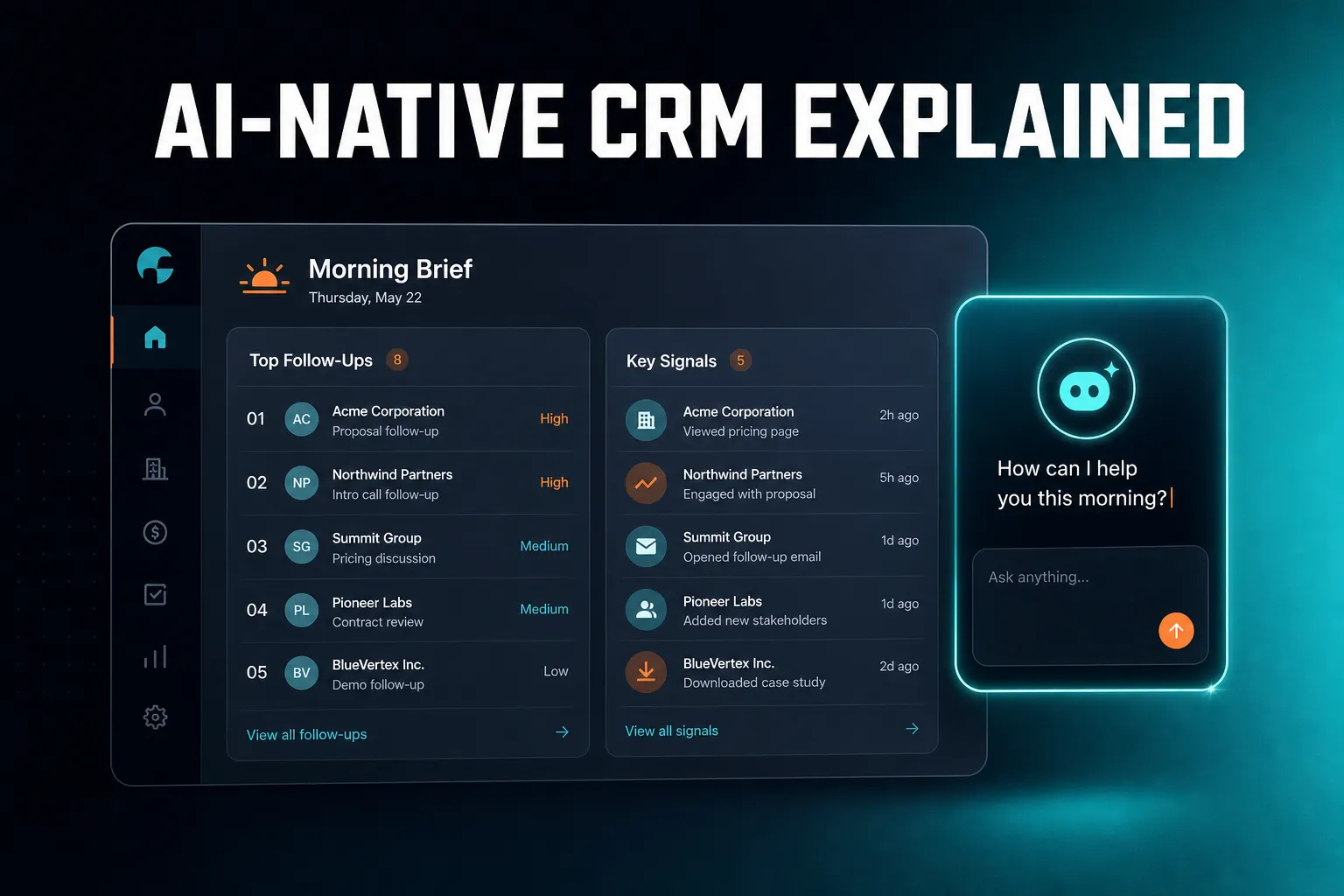
An AI-native CRM is a customer relationship tool designed around AI from the start, so the AI finds what needs your attention and helps you act on it, instead of sitting in a chat box on top of an old database. Terms like AI-first, AI-driven and AI-powered are used loosely, so the practical test is what the CRM does for you on a Monday morning: does it tell you what to do next, and can it help you do it?
This guide explains what each label usually means, how reliable an AI-driven CRM can be, what to look for, and which kind of tool suits which kind of team. It also covers where AICRM fits and where something else is the better choice.
What is an AI-native CRM?
An AI-native CRM is one where AI is part of the foundation rather than an add-on. The system is built so that AI can read your customer data, work out what matters, and take actions such as drafting an email or creating a task. You spend less time searching and entering data, and more time talking to customers.
The contrast is with a traditional CRM, which is a database you fill in and then search. Those tools are often very capable, but the work of noticing what needs attention is left to you. If you want the longer comparison, see our post on AI CRM vs traditional CRM.
A simple way to picture it is the difference between a filing cabinet and an assistant. A filing cabinet holds everything but waits to be opened. An assistant tells you that three people are waiting for a follow-up, one of them emailed you four days ago, and a customer you have not spoken to in months has just changed jobs.
What 'native' should mean in practice
Be sceptical of the word. A genuinely AI-native CRM should show these traits:
- It surfaces things without you asking, such as overdue follow-ups or unanswered emails.
- It can act, not only answer questions, for example creating tasks, logging calls and drafting emails.
- It works from your real data, not generic advice.
- It asks you to confirm before it changes anything.
If a product only offers a chat window that summarises a contact, it is closer to AI-powered than AI-native.
Are AI-first, AI-native, AI-driven and AI-powered CRMs the same thing?
No, though the terms overlap and vendors use them inconsistently. As a rough guide, AI-first and AI-native describe how the product was designed, while AI-powered and AI-driven usually describe features added to a product. There is no official standard, so always check the actual behaviour rather than trusting the label.
Here is a practical way to read them:
| Label | What it usually suggests | What to check |
|---|---|---|
| AI-native / AI-first | Designed around AI from the start | Does it surface priorities and take actions? |
| AI-driven | AI makes or guides decisions, such as scoring or next steps | Can you see why it recommends something? |
| AI-powered | AI features inside a CRM, such as summaries or writing help | Is the AI useful daily, or an occasional extra? |
| Artificial intelligence CRM | A general term covering all of the above | Ask for specifics on what it does |
The label matters less than three questions. Does it tell you what needs attention? Does it give you context about each customer? Can it help you act, with your approval?
That is also the model AICRM follows: Attention, then Context, then Action.
Established CRMs versus newer ones
Many long-established CRMs, including HubSpot, Salesforce, Pipedrive and Zoho, have added AI features to products that already existed. Newer tools tend to position themselves as AI-native from day one. Neither route is automatically better. An established platform may offer depth, integrations and a large ecosystem. A newer tool may feel simpler and more direct. The right choice depends on your team, not the marketing.
What can an artificial intelligence CRM actually do?
An artificial intelligence CRM can typically do four things: summarise customer history, prioritise who needs attention, draft messages, and perform routine admin such as logging notes or creating tasks. The quality varies widely, so test each one on your own data rather than relying on a feature list.
Here is what each looks like in practice.
Prioritising
The CRM works out what needs attention today. That might be overdue follow-ups, emails with no reply, or a contact who has returned to your website. Our post on how a CRM Daily Brief shows what needs your attention covers this in more depth.
Giving context
Before you contact someone, you want to know what happened last time. A good AI CRM pulls the calls, notes, emails and page views into one timeline. See our guide to CRM customer context for more.
Drafting
The CRM drafts an email or outreach message for you to review. The important detail is that it should not send anything without your say-so.
Doing the admin
You say 'log a call with Priya, she wants a demo next week' and the CRM records the call and offers to set a follow-up task. This is where an agent that can write to your data, not just read it, matters. Our post on what an agentic CRM is explains the idea.
How reliable is an AI-driven CRM (affidabilità)?
An AI-driven CRM is as reliable as its safeguards. AI can make mistakes, so look for tools that ground answers in your own data, show the reasons behind scores and recommendations, ask you to confirm changes before they happen, and keep you in control of anything customer-facing. Reliability is a design question, not a promise.
If you are searching for 'AI driven CRM affidabilità' (reliability), it is a fair concern. A CRM holds your customer relationships, so errors have a real cost. Here are the checks worth making.
Does it confirm before it changes anything?
The safest pattern is confirm-before-execute: the agent restates what it is about to do, and you approve it. AICRM works this way for every create, update and delete.
Are its answers grounded in your data?
A reliable assistant should answer from live data, not guess. In AICRM, the agent makes no factual claim without a live tool call, so what it tells you comes from your records.
Can you see why a score or priority was set?
Black-box scoring is hard to trust. In AICRM, lead scores come from rules you define yourself in Settings: job title, industry, company size, location, source, recency, email opens and site visits. Manual adjustments sit on top with a reason attached, and the AI score stays visible underneath.
Does it send things on its own?
It should not. In AICRM, drafts are saved on the contact for you to review, edit and send or discard. The agent only sends when you explicitly ask it to, after confirming.
Is automated data gathering capped?
Unbounded automation can produce noise. AICRM's enrichment pass checks roughly 100 contacts a week for company news and job title changes. Lead Finder runs are capped at 10 candidates, and nothing is added to your contacts until you approve it.
Know the limits
No AI tool sees everything. AICRM only picks up follow-ups from conversations logged in it: notes, calls and meetings recorded there, plus emails sent from AICRM or BCC'd or forwarded to it. It does not listen to calls or read your inbox. Awaiting-a-reply detection covers one-to-one emails sent from AICRM, not campaign emails or emails from your own inbox. Knowing these boundaries is part of using any AI CRM reliably.
What should you look for in the best AI-native CRM?
The best AI-native CRM for you is the one that reliably tells you what needs attention, gives context quickly, and helps you act with little admin, at a price and complexity that suit your team. Judge it with a short checklist instead of a feature count.
- Proactive attention. Does it come to you with a list, or do you have to go looking? A morning summary of follow-ups, replies awaited, signals and tasks is a good sign.
- Clear follow-up handling. Can it pick up 'call me after the 15th' from a logged conversation and bring it back at the right time?
- Customer context. Is the history on one timeline?
- Action, not just answers. Can the AI create tasks, log calls, build segments and draft emails?
- Visible reasoning. Can you see why it prioritised someone?
- Human approval. Is every change or send confirmed by you?
- Honest limits. Does the vendor explain what it does not do?
- Sensible pricing. Is usage clear, and are there per-seat charges that grow with your team?
A concrete test: import a few real contacts, log a couple of conversations, and see what the CRM tells you the next morning. If it only reflects what you typed, it is a database. If it points you to the right person at the right time, it is closer to what people mean by AI-native.
For related reading, see our posts on the best AI CRMs for small businesses and passive vs proactive CRM.
What is the best AI-first CRM for go-to-market teams?
There is no single best AI-first CRM for every go-to-market team. Small teams of founders, consultants and small-business owners usually do best with a lightweight CRM that surfaces follow-ups and reduces admin. Large sales teams that need deep pipeline management, forecasting and complex permissions are usually better served by a bigger, established platform.
Go-to-market covers a lot of ground: marketing, sales, customer success and the handovers between them. So start with what your team actually does.
Small team, mixed responsibilities
If the same few people handle marketing, outreach and customer relationships, you need a tool that keeps follow-ups, segments, campaigns and context in one place. This is where a lightweight, proactive CRM fits. Our post on the best CRM for a team of under 10 with no sales ops goes into this.
Customer marketing and lifecycle work
If you spend your time on lifecycle stages, segments and campaigns, look for strong segmentation and automation. AICRM includes segments, email campaigns with A/B testing, and segment-triggered automation, though it is not only for marketers. See our guide to CRM for customer marketing and lifecycle management.
Outbound prospecting
If you also need to find new people to talk to, check whether the CRM helps with that. AICRM's Lead Finder searches public LinkedIn profiles against your ideal customer and gives you a short list to approve. Our Lead Finder guide covers what it can and cannot replace.
Large or complex sales organisations
If you run a big sales team with multi-stage pipelines, forecasting, territory rules and heavy reporting, a mature platform such as Salesforce or HubSpot is likely the better fit. AICRM is built around contacts, lifecycle stages, lead scores, segments, tasks and campaigns, and is aimed at small teams who want less admin. If you are comparing, our posts on HubSpot alternatives and Salesforce alternatives for small businesses lay out the trade-offs fairly.
How does AICRM approach being AI-native?
AICRM is a proactive CRM that finds what needs attention and helps you act on it, in the same conversation. It follows a simple model: Attention, then Context, then Action. It tells you what matters, and you tell it what to do. Other CRMs also offer follow-up and next-action features, so AICRM's angle is the combination of surfacing and acting.
Attention: the Daily Brief
When you open AICRM, the dashboard computes a live brief. It includes follow-ups due or overdue, emails awaiting a reply, open tasks, new hot and warm signals, recent contact activity, known contacts who came back to your website, recent campaigns, email drafts waiting to be sent, and a count of customers with no contact logged in 90 or more days.
It is also emailed at 7am on weekdays in your timezone, and skipped on days with nothing in it. You can switch it off in Settings. There are no mobile push notifications, and Monday covers the weekend.
Ask 'what needs my attention?' and the agent returns one ranked list from the same data, with a reason for each item: overdue follow-ups and hot signals first, then follow-ups due today, unanswered emails, returning website contacts, warm signals and tasks. It does not rank these by lead score.
Context: one timeline per contact
Each contact has a timeline of calls, emails, meetings, notes and page views, so you can see what happened last time before you reach out.
Action: the agent
You can ask the agent to log a call, create a task, build a segment, or draft follow-ups for your top three contacts. The drafts are saved on each contact without being sent. Voice is simply one way to act: it is a live, real-time conversation in the browser, not recorded voice notes.
Signals
Company news and job title changes are tiered Hot, Warm or Monitor, with a drafted outreach message for the ones that matter. For example, if a customer's company announces funding, it shows up as a signal with a draft ready for you to review.
Website activity
Known contacts are recognised when they return after a form submission. Anonymous visitors are identified at company level only, not as individual people.
What does AICRM not do?
AICRM is not the right tool for every team. It has no phone dialler, SMS or calling features. It does not transcribe recorded voice notes or voicemails, does not read your inbox, and does not identify individual anonymous visitors. Email drafts are one-to-one, with no scheduled send, and they do not sync to your Gmail or Outlook drafts folder.
It also does not replace a heavyweight sales platform. If forecasting, complex pipeline rules or large-team permissions are central to how you work, choose a tool built for that.
Beyond the core CRM, AICRM works with Google Calendar and offers email logging, CSV import and export, embeddable forms and booking pages. If you need a long list of third-party integrations, check that your essentials are covered before you commit.
What does an AI-native CRM cost?
Prices vary widely by vendor, so compare on your own needs. AICRM has three plans, all with the full CRM: Starter at $29 a month (120 voice-agent minutes and up to 2,000 contacts), Growth at $79 a month (400 minutes and up to 5,000 contacts) and Power at $149 a month (600 minutes and up to 20,000 contacts).
There is no per-seat charge and no usage limit on segments, campaigns or automation. Voice minutes beyond your bundle are billed at $0.15 a minute, with a $2 a day safety cap. The 7-day free trial has full features and needs no card to start. Full details are on the pricing page.
How can you try an AI-native CRM without wasting weeks?
The quickest way is to test it on real data for a week. Import a CSV of your contacts, log a few real conversations, and see what the CRM surfaces for you the next morning. If it points you to the right follow-ups and saves you admin, it is doing its job. If not, move on.
Here is a simple trial plan:
- Import 50 to 100 real contacts.
- Log two or three recent calls or meetings, including any promised follow-ups.
- Ask the agent what needs your attention today.
- Ask it to draft follow-ups for your top contacts, then review them.
- After a week, ask: did it help me remember something I would have missed?
If you want to try AICRM, you can start the 7-day free trial, or look through the Features page first. You can also see the demo or contact us with questions about whether it suits your team.
Frequently asked questions
What is an AI-native CRM?
An AI-native CRM is a CRM designed around AI from the start, rather than having AI features added later. It finds what needs your attention, gives you the context, and helps you act, for example by drafting an email or creating a task. The key test is whether it works proactively, not just whether it has a chat box.
Is an AI-first CRM different from an AI-powered CRM?
Often, yes, though vendors use the terms loosely. AI-first usually means the product was designed around AI, while AI-powered usually means AI features sit inside an existing CRM. Check what the CRM actually does for you each day rather than relying on the label.
Are AI-driven CRMs reliable?
They can be, if they have the right safeguards. Look for answers grounded in your own data, visible reasons behind scores, confirmation before any change, and drafts you review before anything is sent. In AICRM, every create, update and delete is confirmed first, and the agent only sends an email when you explicitly ask it to.
What is the best AI-first CRM for go-to-market teams?
It depends on team size and needs. Small teams, founders and consultants who want less admin and help staying on top of follow-ups may like AICRM. Large sales teams that need deep pipeline management and forecasting are likely better served by an established platform such as Salesforce or HubSpot.
Does an AI CRM read my emails and listen to my calls?
Not necessarily, and AICRM does not. It picks up follow-ups only from conversations logged in AICRM: notes, calls and meetings recorded there, and emails sent from AICRM or BCC'd or forwarded to it. It does not listen to calls or read your inbox.
Can I try AICRM before paying?
Yes. AICRM offers a 7-day free trial with full features and no card required to start. You only pay if you choose a plan when the trial ends.